How to Generate a Rule 46 Compliant GST Tax Invoice in FY 2026-27: Practical Tool Walkthrough, Worked B2B Example & Demo Script
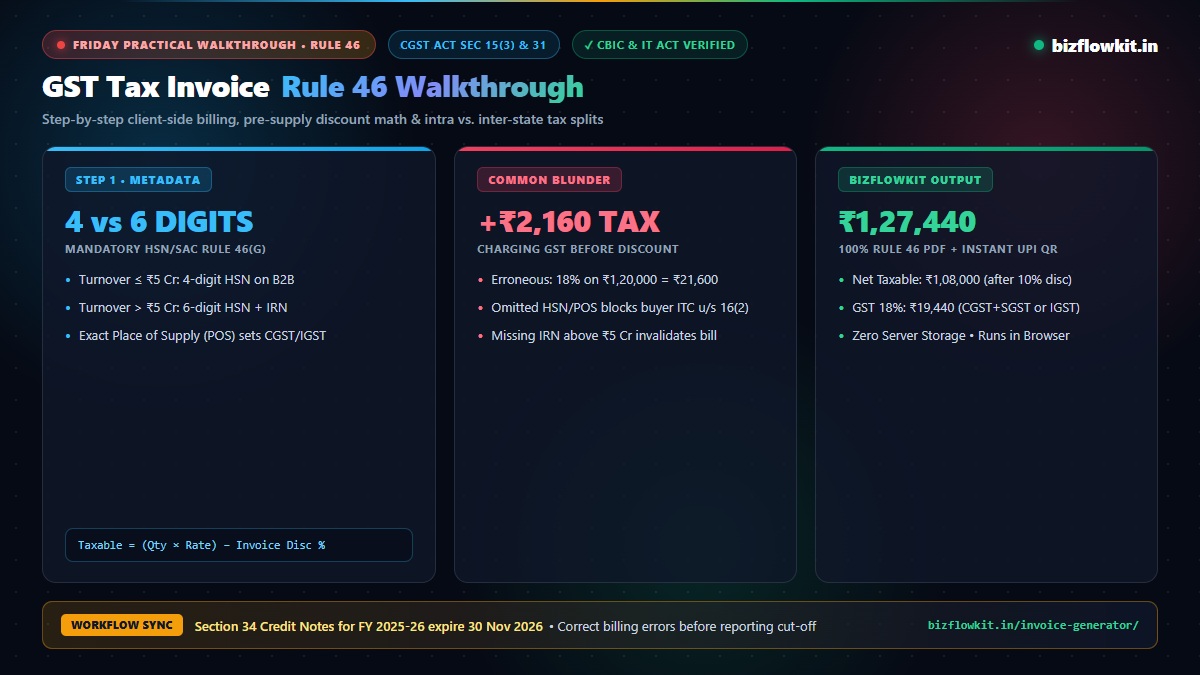
A single missing GSTIN digit, incorrect HSN length, or miscalculated trade discount on a B2B tax invoice can freeze your client’s Input Tax Credit (ITC) under Section 16(2)(a) and delay your payment for weeks. This practical Friday tool walkthrough demonstrates step by step how to generate a 100% Rule 46 compliant GST Tax Invoice for FY 2026–27 using the free, zero-storage BizFlowKit GST Invoice Generator Online, complete with a worked intra-state vs. inter-state example and a 60-second video demonstration script.
Mandatory Tax Invoice Particulars: Under Section 31 of the CGST Act 2017 read with Rule 46 of the CGST Rules, every registered supplier making a taxable B2B supply must issue a tax invoice containing consecutive serial numbers (≤16 characters), seller & recipient GSTIN, Place of Supply (POS), HSN/SAC codes (4 digits up to ₹5 Cr turnover; 6 digits above ₹5 Cr), taxable value net of pre-supply discounts, and split CGST/SGST or IGST tax amounts.
1. Step-by-Step Practical Walkthrough: BizFlowKit GST Invoice Generator
Unlike cloud billing suites that store sensitive vendor rates and client GSTINs on third-party servers, the BizFlowKit GST Invoice Generator executes every calculation and PDF layout locally inside your web browser memory. Follow this 5-step workflow to produce an audit-ready invoice:
-
Configure Invoice Header & Compliance Controls: Upload your Company / Brand Logo, enter a sequential Invoice Series & No. (e.g.,
VPC/26-27/0418), set the Invoice Date and Payment Terms (aligned to 15-day or 45-day MSME Section 43B(h) limits), add an optional P.O. / Reference Number, and verify the Reverse Charge (RCM) toggle. - Enter Seller & Buyer Profiles with Place of Supply (POS): Input your 15-character Seller GSTIN and PAN. In the buyer card, enter the Client GSTIN (or leave blank for B2C retail buyers) and select the exact Place of Supply (POS) state code. Under Sections 12 and 13 of the IGST Act, POS determines whether CGST+SGST or IGST applies.
- Populate Line Items with HSN/SAC & Pre-Supply Discount %: In the interactive line-item table, enter Item Description, HSN/SAC, Qty, Unit, Rate (₹), Disc %, and GST %. The engine automatically deducts the trade discount before calculating GST, ensuring compliance with Section 15(3)(a).
- Embed Bank Details & Instant UPI QR Code: Fill in your Beneficiary Bank Name, Account Number, RTGS/NEFT IFSC Code, and UPI VPA ID to automatically render a scannable payment QR code on the invoice PDF.
- Add Statutory Terms, Signatory & Export PDF: Enter your commercial terms and Authorized Signatory details, inspect the real-time preview, and export your clean PDF.
GST Liability = Taxable Value × (Applicable GST % ÷ 100)
Net Payable = Taxable Value + GST Liability (Rounded to nearest ₹1 u/s 170)
e-Invoicing Check for > ₹5 Crore Turnover: If your PAN-wide Aggregate Annual Turnover exceeded ₹5 Crore in any financial year from 2017–18 onwards, you must also generate an IRN and signed QR code via the Invoice Registration Portal (IRP) under Rule 48(4) and quote 6-digit HSN codes on every B2B supply. Issuing a B2B invoice without an IRN when mandated renders the document legally invalid under Rule 48(5).
2. Verified Worked B2B Example: Pre-Supply Discount & Intra vs. Inter-State Split
Scenario: Vanguard Precision Components LLP (Pune, Maharashtra – State Code 27) supplies 100 units of CNC Machined Brackets (HSN 848390) at ₹1,200/unit with an agreed 10% pre-supply trade discount and 18% GST. Compare the common spreadsheet error against the statutory math generated by BizFlowKit:
| Invoice Line Component | Common Error (Tax Before Discount) | Statutory Intra-State (POS 27) | Statutory Inter-State (POS 29) |
|---|---|---|---|
| Gross Line Value (100 × ₹1,200) | ₹1,20,000 | ₹1,20,000 | ₹1,20,000 |
| Trade Discount (10% u/s 15(3)) | Applied after GST (Invalid) | −₹12,000 | −₹12,000 |
| Taxable Value | ₹1,20,000 (Inflated) | ₹1,08,000 | ₹1,08,000 |
| GST Breakup (18%) | ₹21,600 (Overcharged ₹2,160) | CGST ₹9,720 + SGST ₹9,720 | IGST ₹19,440 |
| Total Invoice Payable | ₹1,29,600 | ₹1,27,440 | ₹1,27,440 |
[00:00–00:15 Hook]: “Sending GST invoices on spreadsheets? One missing field—wrong HSN digits, wrong Place of Supply, or taxing before discounts—can freeze your client’s ITC!”
[00:15–00:45 Live Demo]: “Open bizflowkit.in/invoice-generator/. Enter your Seller GSTIN, Client GSTIN, and Place of Supply. Add your line item, 6-digit HSN 848390, Rate ₹1,200, and 10% Discount. Watch it auto-compute ₹1,08,000 taxable value, split CGST/SGST or IGST, and embed an instant UPI payment QR.”
[00:45–01:00 CTA]: “Zero data leaves your browser. Export your Rule 46 compliant PDF free at BizFlowKit!”
Generate a Rule 46 Compliant GST Invoice in 60 Seconds
Auto-compute pre-supply discounts, CGST+SGST vs. IGST tax splits, and instant UPI payment QR codes directly in your browser without creating an account.
3. Frequently Asked Questions (Rule 46 & GST Invoicing)
How many HSN code digits are mandatory on a B2B GST invoice in FY 2026–27?
Under Rule 46(g), taxpayers with Aggregate Annual Turnover up to ₹5 Crore must mention at least 4-digit HSN codes on B2B invoices. Taxpayers exceeding ₹5 Crore turnover must quote 6-digit HSN codes on all B2B and B2C supplies.
Does BizFlowKit store my client GSTINs or invoice prices?
No. The BizFlowKit GST Invoice Generator executes 100% inside local browser memory. No invoice amounts, logos, or client GSTINs are logged or transmitted to external servers.
Should GST be charged before or after deducting a trade discount?
Under Section 15(3)(a) of the CGST Act, any discount given before or at the time of supply and duly recorded on the invoice must be deducted before computing GST.
How do I correct an overbilled invoice after issuing it?
Issue a GST Credit Note under Section 34 of the CGST Act and report it in GSTR-1 on or before 30 November following the end of the financial year (or GSTR-9 filing, whichever is earlier).